
 Available
PDF Split to Markdown
A no-backend PDF-to-Markdown tool that sends pages to Gemini in parallel with your own key, flags pages where the model looped, and reruns only those.
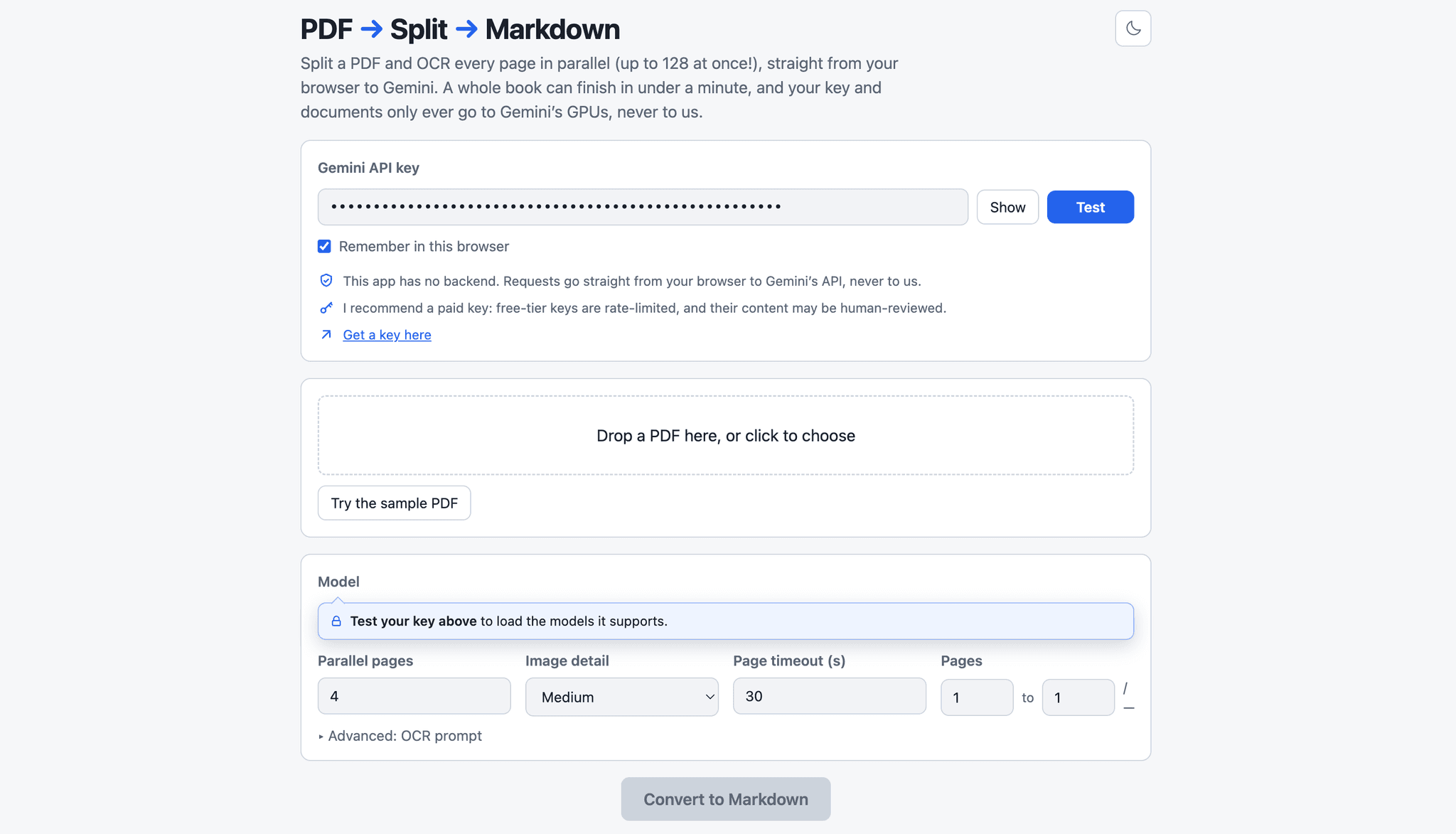
Paste a Gemini key, drop in a PDF, and set parallel pages, image detail, timeout, and page range before anything runs.
One page per request
I run into massive PDFs day to day, and I wanted a really fast way to turn them into Markdown an LLM can read. Gemini models got really good, really fast, at looking at PDF pages as images and transcribing them, so the plan was simple: split the PDF and send the pages in parallel.
This started as a Python script: PyMuPDF cut a PDF into one-page PDFs, and a
pool of async workers sent each one to Gemini to transcribe as Markdown. It's
still in the repo under reference/. The web app is a port of it that runs in
the tab, with your own Gemini API key.
Pages still go to Gemini as one-page PDFs, four at once by default, and you can
raise that to 128 if your key's rate limit can take it. Splitting happens one
page at a time, just ahead of the requests, so pdf-lib never copies pages out of
the shared document concurrently, and only about as many one-page PDFs sit in
memory as there are workers. Pages come back in whatever order Gemini finishes
them, and the Markdown is put back together in page order at the end.
When Gemini loops
Sometimes a page "succeeds" and the text is a Markdown table separator thousands of dashes long. The model got stuck. So any page with 200 or more of the same non-space character in a row is flagged as suspect, in amber, apart from real failures in red. Flagged pages are already filled into the re-OCR box, and the rerun defaults to the next model up the price ladder. Only those pages go out again, against the PDF that's already parsed. The check only catches a single repeated character, though. A repeated phrase or an ordinary misread gets through.
Retries and truncation
Automatic retries are narrow on purpose. Only rate limits (429) and overloads
(503) retry on their own, using the delay in Google's RetryInfo when it sends
one, capped at 30 seconds. That delay comes in the JSON body, which helps,
because a browser can't reliably read the Retry-After header across origins. A
timeout or a truncated page fails right away and waits for you to rerun it,
maybe on a different model.
Thinking tokens come out of the same output budget as the transcription, and
they bill as output. So the app turns thinking down as far as each model allows:
off on 2.5 Flash, minimal on most 3.x models. It asks for the full
65,536-token output budget so a dense page has room.
What it costs
You get an estimate before the run and the actual cost, worked out from the token counts Google reports, when it finishes. A page that got cut off still counts its tokens. One test page cost 0.0145¢. The app first showed that as "0.01¢ · in line with estimate 0.02–0.06¢", which was correct and looked completely wrong, so costs under a tenth of a cent now get a third decimal.
Where your PDF goes
There's no backend. Your pages and your key go from the browser straight to
Google, because that's where the OCR happens. The page's content security policy
allows connections only to Google's API and the site itself. The key travels in
the x-goog-api-key header, and if you tick "Remember in this browser", it's
stored in localStorage. Bring a paid key: free-tier keys are rate-limited,
which throttles the parallelism, and Google may have people review free-tier
content.
Get a key from Google AI Studio, drop a PDF on pdfsplitparse.com, and hit Convert to Markdown. Every tenth conversion gets a brighter, faster sunburst.